Intro
Over time, my collection of Playstation games has turned towards finding games that feel a little weird. A lot of games in the mid-to-late 90s had the energy of throwing anything at the wall, and seeing what stuck - this is how we ended up with Kurashi no Manners (a guide to Japanese manners), Suzuki Bakuhatsu (a game where you disarming bombs literally everywhere) and Egg (egg).
One area in particular I like to collect from is Simulation games - think tycoon games, life games, countless Densha de Go versions etc. With the recent rise of cozy life sims, one game caught my eye during a Mandarake visit last year - Omise de Tensyu (or The Shopkeeper):
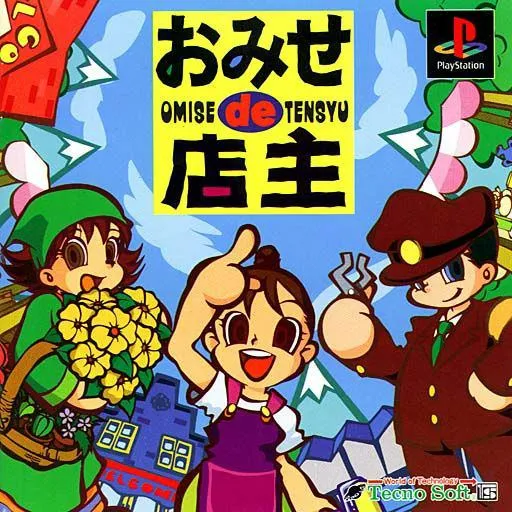
| Description |
|---|
Embark on an adventure around the world and find job cards. Collecting cards expands the range of of available jobs to a whopping 40 different types! During your adventure, gain experience by selling items. Build a shop, and become a shop owner. Once you become a full-fledged professional, open your own shop in your town! When a new shop opens, all sorts of people will gather around it. City planning is interesting You can expand your city, change the pavement and streetlights and more. Build all sorts of shops and create your own town. With a memory card, you can even visit towns created by your friends! |
Released in 1999 by Technosoft, and re-released on PS3 and PSP in 2010, Omise is billed as a “Shopkeeper RPG,” and can relate itself the early Mystery Dungeon games (specifically Torneko’s Great Adventure).
I admit I originally bought it partly for its content, but also, there isn’t a whole lot about this game outside of the Japanese-speaking side of the internet. Turns out the reason may be that it’s not a very good game? I found it in a book called “Shitty Games for Playstation” (プレイステーション クソゲー番付):
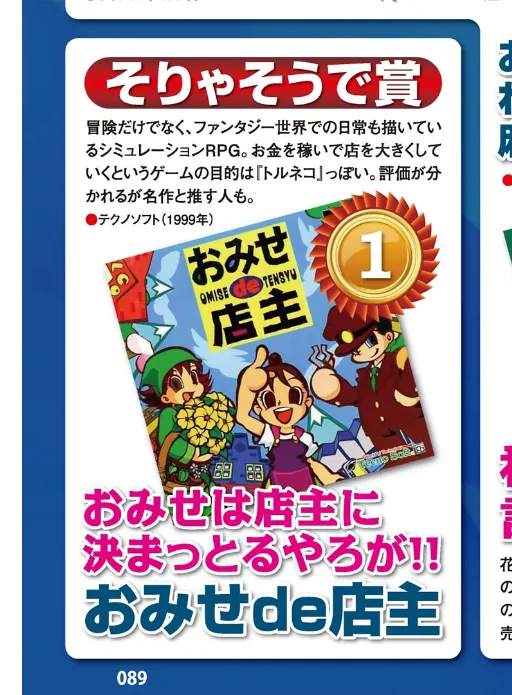
To be fair to Omise, this entry isn’t about gameplay, more poking fun at the name of the game - it says “Of course it is Award - The shop is obviously run by the owner,” But there are a couple reviews online saying “It’s okay.” I guess it’ll be loved by those who played it as a kid, but really it wasn’t a good game (Thinking of you, Stars Wars Episode 1 - The Phantom Menace for PS1)
But anyway, we’re not here today for a gameplay review of Omise de Tensyu, no, we’re here because I can’t help taking things apart to find new Discord emoji content.
This post will be a run-down of all the work I’ve done so far in reverse
engineering the files and formats of the game. As of writing (May June July August 2026) I’ve
managed to extract the files out of a VFS, and a further decompression of the
.PAC files contained within.
The end goal of many reverse engineering projects like this on Japan-only games is to localise them into English. Pulling apart is easy, putting back together is arguably the more difficult approach, let alone the translation effort, so, for now this post will just be about documenting the formats within, and not about how to fan-translate a game.
I’d also like to lay a disclaimer that I don’t purport to be an expert at any of this, so there may be errors or missed assumptions along the way. At the end of the day I’m here to have fun and share what I’ve found - feel free to improve on my work if you so wish!
| Disclaimer |
|---|
Now for an actual disclaimer. Reverse engineering being a bit of a grey area leads me to state the following: All work in this project stems from a legally acquired copy of Omise de Tensyu - in fact, I probably overpaid for it - but either way, I own a copy of this game. I’d also like to express that this project is purely out of curiousity, and a desire to document that journey. Small excerpts of file data and imagery are shown to help explain what is ging on, but no game files, code, or assets are distrubuted as part of this post. Omise de Tensyu remainds the property of Sega (spoilers) Lastly, the views and opinions expressed in this post are my own and do not necessarily reflect those of my employer (since I work in software and all). This work was done in my own time, on my own equipment. Hokay, serious messaging out of the way, lets begin~ |
Overview
This post will be in two parts.
The first part will be going over the exploration of the VFS. These can tend to be straightforward, so I’ll take you through the steps and thoughts that played out as I went over them. Think it of it more like a journey, rather than an explanation.
The second part will be the more complex one, discussing the decompression of
.PAC files. Compression in the reverse is a pretty complicated topic, which
is probably why you don’t hear it talked about often in detail. Because of this,
this part is more a report on what I found - more of an explanation than a
journey.
On that note, where better to start than inserting the disc?
First Steps
Whats on the CD?
Plugging in my trusty usb CD drive, I was able to extract the following files from the disc:
| Path | Size | What is it? |
|---|---|---|
SLPS_018.76 | 662kb | The main PSX executable. This is common for every game |
SYSTEM.CNF | 69 bytes | Boot config. This is also common for every PSX game |
TENSYU/OT.IX | 15kb | ??? |
TENSYU/OT.IM | 14.9mb | ??? Could be related to OT.IX? |
TENSYU/ZTCDATA.OT | 637.5mb | ??? Based off of its size, I imagine it’s a lot of media. |
I immediately booted up jPSXdec and added our
disc image to it. After a bit of analysis, it found a fair few .TIM images
stored in our OT.IM file:
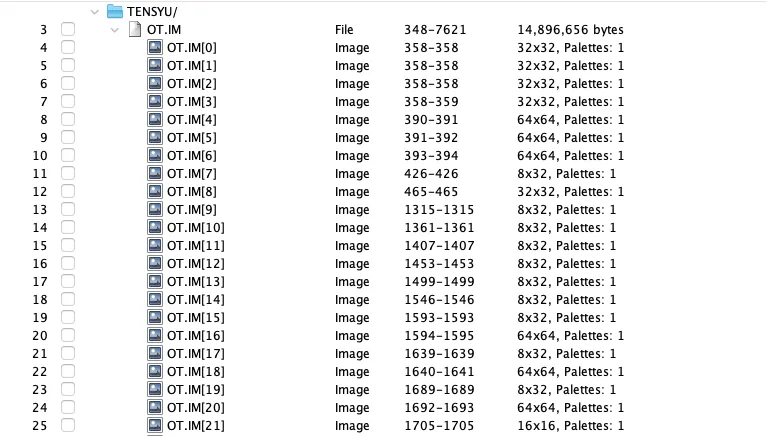
This was a common sight in many games of the time - resources were slim, and you had to fight the CD drive to load your assets in a predictable and known manner. Indexing files within a single file gives you the benefit of being able to control where files ended up in relation to one another.
In our case, two things stand out to me:
Firstly, this isn’t all the media in the game. There are a lot more sprites than whats here - not to mention audio and the like. This means they’re probably hiding in one of our other files.
Secondly, since OT.IX and ZTCDATA.OT didn’t show up in the decoder, it means
that there is more processing done on these files from within the executable.
I was hoping to see .SEP/.SEQ/.VAB/.XA files (audio) or .STR (video) files
in ZTCDATA.OT to confirm my hunch, but it’s probably likely there is some sort
of processing or compression on this file done elsewhere.
At this point, I’m going to continue with my hunch that OT.IX and OT.IM are
somehow linked. Since OT.IX is the smaller of the two, we’ll start there.
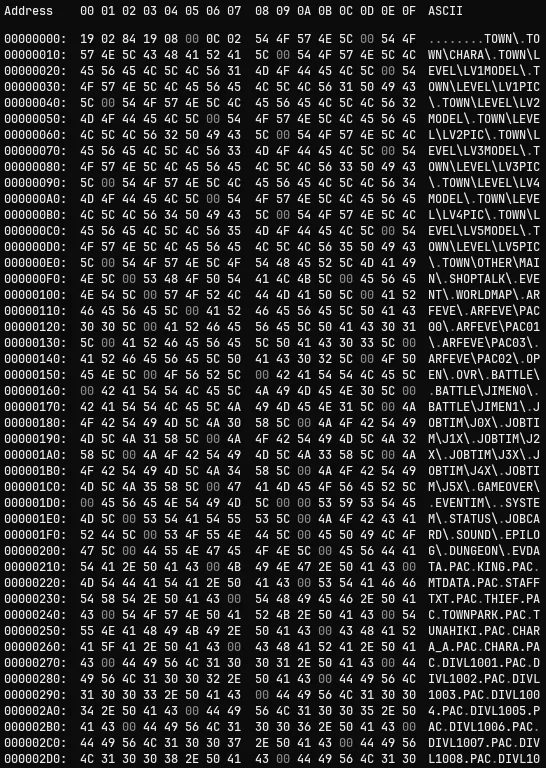
Oho, would you look at that!
What have we got here?
Immediately upon opening OT.IX we’re met with what looks like a list of
directories and files. Let’s see if we can glean anything from this:
- The first 8 bytes look suspiciously like a header (no text, on the byte boundary etc.)
- Our list of filenames seem to be grouped by directories at the front, files
second (it switches at 0x00000200 with
EVDATA.PAC)
If we continue down the file, there is some other suspiciously shaped data:
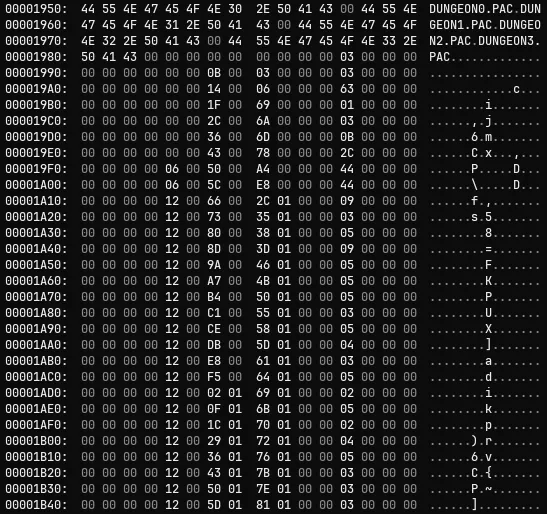
A couple more things we can gauge from this is that there are some columns that are incrementing, and others that are repeating.
Based off this knowledge, and a bit of intuition, I think this is a file index. I’m hoping that there is data in the header that tells us how many items there are in this file, and then I’m expecting the column that is increasing is some byte offset into one of our other files. The repeating column, I’m guessing, is probably pointing back into our directory / filename structure.
At this point, there may be a little bit of glossing over how I came to some conclusions. A lot of it is head scratching for a while, but the techniques are not too disimilar to some of the techniques Hilltop describes in his videos.
Parsing an .IX/.IM File
Header
Our .IX file starts with a 16 byte header: 0x1902 0x8419 0x0800 0x0C02.
I’ve broken them up into four 4-byte numbers, partly because it’s easier to
read, but also because they actually describe offsets within our file.
The smoking gun to this fact is our latter two pairs - 0x0800 (8) and
0x0C02 (524). Assuming they’re byte offsets, they point to the first
entry of our block of directories, and the second conveniently points to the
first entry of our filename block.
Taking this knowledge, we can see that our byte data seems to also start
at the point described by 0x8419 (6532). Therefore, we can guess our header
is:
| Hex (LE) | Decimal | Use |
|---|---|---|
| 0x1902 | 537 | ??? |
| 0x8419 | 6532 | Records Offset |
| 0x0800 | 8 | Directory Offset |
| 0x0C02 | 524 | Filename Offset |
Using this, building a script to unpack the file structure isn’t too hard. I’ve
reused my ByteReader class from my .TIM post again:
import { ByteReader } from "./reader.ts";
import fs from "node:fs";

const index = fs.readFileSync("ot.ix");
const reader = new ByteReader(index.buffer);

const unknown = reader.readHalf();
const recordOffset = reader.readHalf();
const directoryOffset = reader.readHalf();
const filenameOffset = reader.readHalf();
Filepaths
We can parse through the directory and filename listing using the offsets and build a lookup of byte offset -> string value. We don’t need to differentiate them when reading the actual data, so I’ll add them all into the same lookup:
const filepathsBuffer = index.buffer.slice(directoryOffset, recordOffset);
const filepathsView = new DataView(filepathsBuffer);

const filepathsLookup = new Map<number, string>();
const decoder = new TextDecoder("latin1");

let currentStr = [];
let start = 0;

for (let i = 0; i < filepathsBuffer.byteLength; i++) {
  const byte = filepathsView.getUint8(i);

  // If we've run into a null byte, then it's a null terminator for the string
  if (byte === 0) {
    filepathsLookup.set(
      start + directoryOffset,
      decoder.decode(new Uint8Array(currentStr)),
    );
    currentStr = [];
    start = i + 1;
  } else {
    currentStr.push(byte);
  }
}
After this runs, we get this:
"8": "TOWN/",
"14": "TOWN/CHARA/",
"26": "TOWN/LEVEL/LV1MODEL/",
"47": "TOWN/LEVEL/LV1PIC/",
"66": "TOWN/LEVEL/LV2MODEL/",
"87": "TOWN/LEVEL/LV2PIC/",
"106": "TOWN/LEVEL/LV3MODEL/",
"127": "TOWN/LEVEL/LV3PIC/",
"146": "TOWN/LEVEL/LV4MODEL/",
<snip>
"4683": "JIMEN29.PAC",
"4695": "JIMEN30.PAC",
"4707": "LOG",
"4711": "JIMEN31.PAC",
"4723": "SEJ04.TXT",
"4733": "BATTLE_F.PAC",
"4746": "J00M.TIM",
<snip>
Records
Since our file and directory names don’t have any forward references, we can assume that the records themselves must reference back to our lookup.
Digging through the listing, I’ve picked out the SOUND directory, as it only
has two files in it, so we should see reference to thre SOUND/ directory
twice. The byte positions of the directory and files are:
- Directory:
"500": "SOUND/"(0xF401) - Files:
"6356": "SOUND2.PAC"(0xD418)"6367": "SOUND.PAC"(0xDF18).
A quick search in our hex editor, however, doesn’t surface anything for these values. One approach is to see if our values are offset by something - say, the offsets in our header?
- Directory:
0xF401(500) -0x0800(8) =0xEC01(492) - Filenames:
0xD418(6356) -0x0C02(524) =0xC816(5832)0xDF18(6367) -0x0C02(524) =0xD316(5843)
Plugging these into our hex editor, we can see that there are indeed two entries
next to another referencing 0xC816 and 0xD316:
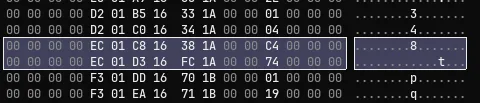
Next, it’d be handy to have two things: Where our data is, and how big it is. Looking at our SOUND entries, they seem to be followed by what looks like two values:
- SOUND2.PAC -
0x381A0000(6712) and0xC4000000(196) - SOUND.PAC -
0xFC1A0000(6908) and0x74000000(116)
It’s not a coincidence that 6908 (SOUND.PAC first number) - 196
(SOUND2.PAC second number) = 6712 (SOUND.PAC first number) - our VFS needs
to know how big the file is it’s pointing at, plus where that file is in our
data. I’m going to hazard a guess that our first 4 bytes here are the offset in
the file, and the next 4 are the size of the file. This leaves 4 bytes of
padding between entries, leaving us with the following format:
| Hex | Size | Description |
|---|---|---|
| 0xEC01 | 2 bytes | Pointer to Directory Lookup (offset by value in header) |
| 0xD316 | 2 bytes | Pointer to Filename Lookup (offset by value in header) |
| 0xFC1A0000 | 4 bytes | Pointer to the start of the file |
| 0x74000000 | 4 bytes | Size of the data |
| 0x00000000 | 4 bytes | Reserved / Padding? |
In code, it’d look something like this:
const recordsData = index.buffer.slice(recordOffset);
const recordsReader = new ByteReader(recordsData);

const records = [];

while (recordsReader.position() < recordsData.byteLength) {
  const dirOffset = recordsReader.readHalf();
  const nameOffset = recordsReader.readHalf();
  // Fixing slashes 'cause I'm not on Windows
  const directory = filepathsLookup
    .get(dirOffset + directoryOffset)
    ?.replaceAll("\\", "/");
  const filename = filepathsLookup.get(nameOffset + filenameOffset);
  const dataStart = recordsReader.readWord();
  const dataSize = recordsReader.readWord();
  // Our reserved space
  const _ = recordsReader.readWord();

  records.push({
    directory,
    filename,
    dataStart,
    dataSize,
  });
}
What we’re left with is a collection of file records:
// ...
{
    "directory": "SOUND/",
    "filename": "SOUND2.PAC",
    "dataStart": 6712,
    "dataSize": 196
  },
  {
    "directory": "SOUND/",
    "filename": "SOUND.PAC",
    "dataStart": 6908,
    "dataSize": 116
  },
//...
But to what?
Extraction
Before we we begin, the records array has a length of 537 entries. If you remember, our header had a unknown value which also happened to be 537, that probably means our missing entry is file count - which makes sense.
When it comes to which file this is pointing at, I’m pretty confident it’s
OT.IM:
- We already know it contains un-compressed files (those .TIM images from before)
- The sum of
dataSizeis7274. If it’s bytes, its too small for anything, but if it’s sector count then it’s7274 * 2048 = 14.8mbwhich feels awfully similar to the filesize ofOT.IM. - It’s called
OT.IM, our index isOT.IX.
Now we have all the pieces in play, extracting the data from OT.IM is pretty
straightforward:
const data = fs.readFileSync("OT.IM");
const dataBuffer = new Uint8Array(data);

const SECTOR_SIZE = 2048;

for (const record of records) {
  fs.mkdirSync(`./output/${record.directory}`, { recursive: true });
  const start = SECTOR_SIZE * record.dataStart;
  const fileData = dataBuffer.slice(
    start,
    start + SECTOR_SIZE * record.dataSize,
  );
  fs.writeFileSync(`./output/${record.directory}${record.filename}`, fileData);
}
Wahay!
What have we got?
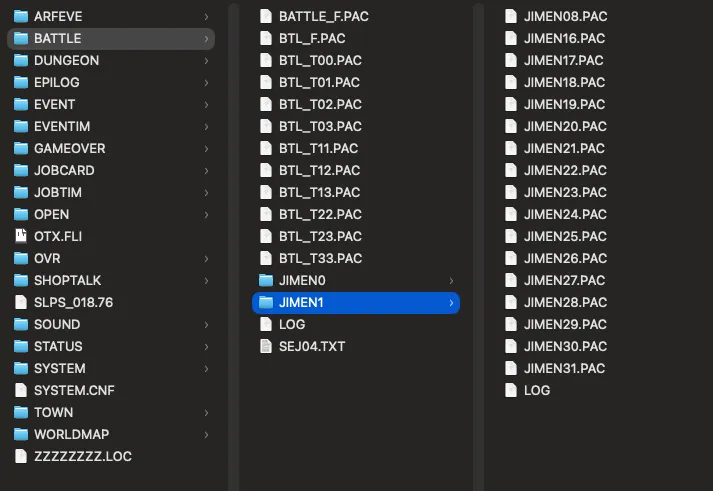
After extracting everything, we’re left with something that resembles more of a filesystem we’re used to. A couple fun notes as we go along:
- We seem to have wrapped up
SLPS_018.76andSYSTEM.CNFin our VFS, however the SYSTEM.CNF file refers to aOT.exerather than the PS1 executable. Our two SLPS_018.76 files appear to be exact matches with one another - Those .TIM files seem to be under
/JOBTIM- I guess they’re frequently used enough that there’s no need to process them further BATTLE/seems to contain a couple files that aren’t probably meant to be there -SEJ04.TXTandLOG. The .TXT file doesn’t have anything of real use but LOG is interesting - more on that later- ZZZZZZZZ.LOC is a junk file - probably a method to align files on the disc, or maybe some old data leftover from dev that got swept up into the executable.
OTX.FLI when shifted to ShiftJIS encoding makes a reference to TGS 98 - “TGS98出展バージョンだよ” which translates to “This is the TGS 98 Exhibition Version” or something. Doing some digging, they were indeed at the Autumn TGS (they used to have two a year?)
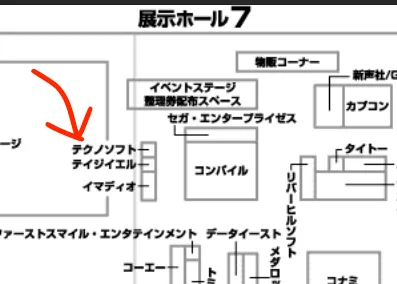
This was about the time that the company faced financial troubles, explaining the smaller booth size. Fellow companies in the vicinity that met similar fates are Compile (コンパイル, to the right) of Puyo Puyo fame, Riverhill Soft (リバーヒルソフト, to the lower right) and Data East or DECO (データエースト).
But other than that, we seem to be left with a number of .PAC files, and no
clear indication of what they are.
Parsing a .PAC file
Opening them in our hex editor doesn’t show anything too obvious, other than they all seem to have the same columns pattern of incrementing numbers we saw before, but this time at the beginning of the file. Checking for filenames, or changing encoding doesn’t seem to identify any obvious text, which leads me to feel that they are compressed in some form.
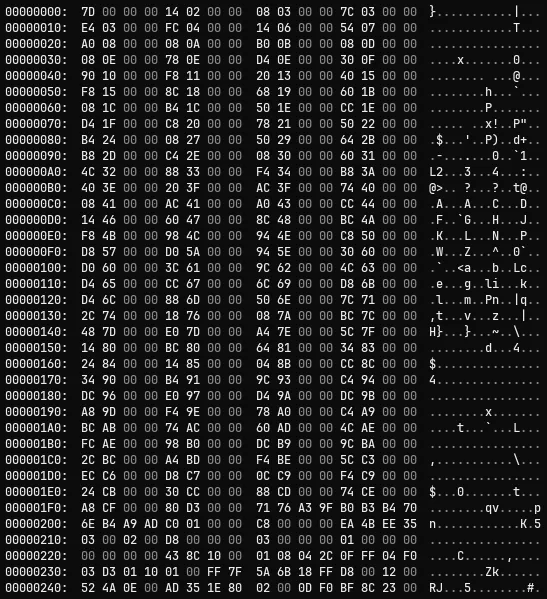
Rather than jumping headfirst into picking our file apart - I wouldn’t say I’m very proficient at unpicking compression routines - I wonder if there’s anything we can glean from that LOG file from before:
Data Pack for DOS  v0.10  By OOTUKA  (C)1996 Technosoft Co.,ltd

<BTL_T13.PAC>のリストを表示します。
--------------------------------------------------------------------------
itemcom.txt   99/01/18 21:39.22  [   11392] [    2931]  25.73%  -lh5- (16)
syoubai.tim   98/06/07 17:20.40  [    1088] [     517]  47.52%  -lh5- (16)
miss.tim      98/10/08 10:31.58  [     256] [     138]  53.91%  -lh5- (16)
num.tim       98/11/12 20:57.40  [     448] [     191]  42.63%  -lh5- (16)
kaifuku.tim   98/06/07 17:20.40  [    2112] [     336]  15.91%  -lh5- (16)
healing.tim   98/06/07 17:20.40  [    2112] [     251]  11.88%  -lh5- (16)
fire.tim      98/12/10 11:36.06  [     576] [     412]  71.53%  -lh5- (16)
btl_item.tim  98/10/06 10:07.04  [    2112] [     903]  42.76%  -lh5- (16)
panic.tim     98/09/29 10:26.58  [     320] [     184]  57.50%  -lh5- (16)
nige.tim      98/12/16 17:20.22  [     320] [     260]  81.25%  -lh5- (16)
dougu.tim     98/12/16 17:20.22  [     320] [     276]  86.25%  -lh5- (16)
kemuri.tim    98/06/07 17:20.40  [    2112] [     520]  24.62%  -lh5- (16)
...
Using this, I’d like to see if someone else has given a go at decompressing
.PAC files.
Plugging in Data Pack for DOS v0.10 into Google brings up a rather bemusing
thread from foone losing
their mind at unpacking a version 1.3 of the tool used in
Azumanga Donjyara Daioh.
I find it rather funny that the developers there also left a LOG file in the
output of another game. Anywho, they suggest pulling the decompression routine
out of the executable directly via Ghidra, which is an idea.
Searching for terms like “Technosoft OOTUKA” or “Technosoft PAC” files surfaced an old romhack utility called Thunder Force V PAC Tool. Thunder Force V (TFV) was another game developed by Technosoft around the same time, so hopefully I could run this and decompress our .PAC files:
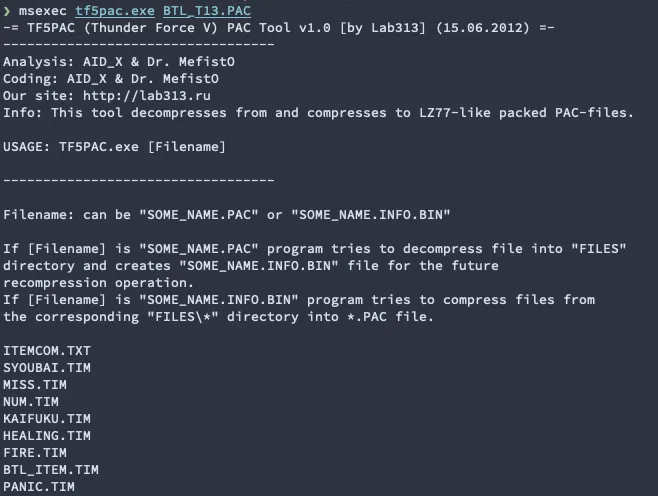
Would you look at that - seems that Thunder Force 5 shared the same DataPack PAC
processing as our game. Arguably we could call this project there, and just
utilise our .exe for decompression (and compression, even) but I was curious
if there was any documentation out there for how the compression actually
works.
Unfortunately a dozen vigourous internet searches yielded very little in terms of documentation. The upside is that the author is still active in the Playstation and Sega MegaDrive communities, even maintaining the PSX loader for Ghidra I’ve used and abused a ton - neat!
So, for the sake of satisfying my curiousity I decided to continue down the
path of figuring out how these .PAC files are decompressed, the TF5PAC.exe
becomes another handy tool to verify things as I work through them.
File Layout
Our .PAC file starts with a 4 byte number describing the number of entries,
followed by that number of 4 byte pointers to other places within the file.
| Example | Size | Description |
|---|---|---|
| 0x10000000 | 4 bytes | How many entries in this file |
| 0x60000000 | 4 bytes * ENTRY_COUNT | Pointer to an entry in file |
The entries are a little tricky - the pointer doesn’t actually point to the start of the entry, rather, it’s pointing to a pointer to the next entry. I’m not sure why there are two levels of pointer, but I imagine it’s to do with how these were intended to be read by the game executable (as it is unlikely the files were extracted into memory in their entirety)
| Example | Size | Description |
|---|---|---|
| 0xA5AEA49F 0x72706EB4 0xA9AD0000 | 12 bytes | Obfuscated Filename |
| 0x20200000 | 4 bytes | Raw Size |
| 0x34010000 | 4 bytes | Compressed Size |
| 0x189EA236 | 4 bytes | Modified Time? |
| 0x03000200 | 4 bytes | Flag? |
| 0x44010000 | 4 bytes | Pointer to next Entry |
| 0x03000000 | 4 bytes | Extra A (always 3) |
| 0x01000000 | 4 bytes | Extra B |
| 0x00000000 | 4 bytes | Extra C (maybe an index for sequences of files, sej01.tx = 1, sej02.txt = 2 etc.) |
| … | COMPRESSED_SIZE bytes | Compressed Data |
| … | X bytes | Padding |
A few things to observe in this block:
- Funnily enough, it seems filenames are shifted slightly to obfuscate them. The
TF5 decompressor shows that if we subtract
0x40from each ASCII character, then they seem to become legible. This isn’t done in the PSX executable. - Names are 00 padded if they’re shorter than the 12 bytes allocated.
- Flags are always
0x03000200 - The PSX executable, nor the TF5 decompressor identify the Modified time block
in any manner, but based off of the value for
syoubai.timbeing897207640, and converting it to unix time returns7th of June, 1998 at 17:20:40which is the time for this file in the LOG. - Deceptively, the pointers in this block aren’t offset like the ones in our
header are. Those are offset by
0x1C, wheras the ones in the entry are actually the start of the next header entry (not their pointer block). I feel too dumb to intuit why that may be. - Entries are padded to fit on the 4 byte boundary. Seems to be
0x30,0x31etc. depending on the number of bytes to pad - I’m not fully sure what the extra fields are doing - one seems to say 0x03 every entry though, and the other is an index that matches the filenames index.
- Amusingly, it seems these files contain a bunch of fragments of old memory from the machine they were built on. I’m pretty sure this is because these files sizes are padded up to fit on CD sector boundaries, so every now and then you can actually see symbols from the old PS1 SDK.
If we happen to decode another Technosoft game down the line, here’s an ImHex pattern we can plug in:
fn decode_name(ref auto obfName) {
    str result;
    for (u8 i = 0, i < 12, i+= 1) {
        if (obfName[i] >= 0x41) {
            result += char(obfName[i] - 0x40);
        }
    }
    return result;
};

struct FileEntry {
    u8 name[12][[format("decode_name")]];
    u32 raw_size;
    u32 comp_size;
    u32 mtime;
    u32 flag;
    u32 ptr;
    u32 extra_a;
    u32 extra_b;
    u32 extra_c;
    u8 payload[comp_size];
    padding[ptr - 0x10 - comp_size];
};

struct PACFile {
    u32 entry_count;
    u32 entry_pointers[entry_count];
    FileEntry entries[entry_count];
};

PACFile pacFile @ 0x0;
Parsing
Lets write some code for what we have got so far. We’ll load the file up and
read the entries and pointers. Since we have a LOG we’ll use what it’s
telling - BTL_T13.PAC.
import { ByteReader } from "./reader.ts";
import fs from "node:fs";

const pac = fs.readFileSync("BTL_T13.PAC");
const buffer = pac.buffer;
const reader = new ByteReader(buffer);

const entryCount = reader.readWord();

const offsetTable = [];
for(let i = 0; i < entryCount; i++) {
  offsetTable.push(reader.readWord());
}
We then can use this offsetTable an iterate over each of our entries and at
least parse their metadata as per the entry header described above:
const files = [];
for(let i = 0; i < offsetTable.length; i++) {
  const offset = offsetTable[i];
  const entryStart = offset - 0x1c; // as per above, pointers are not the first byte of the table.
  const entryEnd = i + 1 < offsetTable.length ? offsetTable[i + 1] : buffer.byteLength;
  files.push({ start: entryStart, end: entryEnd });
}
Then, for each of our blocks, we can slice our original buffer, instantiate a
new byte reader, and parse their headers. I’ve added a new function to our
ByteReader called take which will ‘take’ n bytes and return them as a
Uint8Array. This’ll come in handy when parsing the filename:
function decodeFilename(bytes: Uint8Array) {
  const out = [];
  for(const byte of bytes) {
    out.push(byte < 0x41 ? 0 : byte - 0x40);
  }
  // remove any 0s from the end
  while(out.length && out[out.length - 1] === 0) {
    out.pop();
  }

  return String.fromCharCode(...out);
}

for (let i = 0; i < files.length; i++) {
  const file = files[i];
  const subBuffer = buffer.slice(file.start, file.end);
  const entryReader = new ByteReader(subBuffer);

  // Filename, 12 bytes.
  const filenameBytes = entryReader.take(12);
  const name = decodeFilename(filenameBytes);

  // Standard metadata
  const rawSize = entryReader.readWord();
  const compressedSize = entryReader.readWord();
  const modifiedTime = entryReader.readWord();
  const flag = entryReader.readWord();
  const pointer = entryReader.readWord();
  const extraA = entryReader.readWord();
  const extraB = entryReader.readWord();
  const extraC = entryReader.readWord();

  const compressedBytes = entryReader.take(compressedSize);

  const fileData = {
    filename: name,
    rawSize: rawSize,
    compressedSize: compressedSize,
    modifiedTime: new Date(modifiedTime * 1000),
    flag,
    pointer,
    extraA,
    extraB,
    extraC,
    compressedBytes,
  };
}
Outputting this to our log, we get the following:
[
  {
  filename: 'itemcom.txt',
  rawSize: 11498,
  compressedSize: 2990,
  modifiedTime: 1999-02-07T02:46:10.000Z,
  flag: 131075,
  pointer: 3008,
  extraA: 3,
  extraB: 917508,
  extraC: 0,
  compressedBytes: <Uint8Array>
},
{
  filename: 'syoubai.tim',
  rawSize: 1088,
  compressedSize: 517,
  modifiedTime: 1998-06-07T08:20:40.000Z,
  flag: 131075,
  pointer: 536,
  extraA: 3,
  extraB: 1,
  extraC: 0,
  compressedBytes: <Uint8Array>
},
{
  filename: 'miss.tim',
  rawSize: 256,
  compressedSize: 138,
  modifiedTime: 1998-10-08T01:31:58.000Z,
  flag: 131075,
  pointer: 156,
  extraA: 3,
  extraB: 1,
  extraC: 0,
  compressedBytes: <Uint8Array>
}
...
]
Now we get to the fun part.
Decompression
At this point, we have the individual file components, but their data is compressed. We can extract the original code from the executable, and plug their decompression routines into some code like foone did (threatend?) above, and slowly modify it into something more readable.
For a bit of background, the TF5PAC tool describes that TF5 used a modified
LZ77 compression format. LZ77 is the grandpappy of most of the modern
compression formats we have today - DEFLATE (behind .zip files) and PNG both
can link themselves back to the original algoirthm.
The core concept is that data tends to be repeating, so what if instead of storing the repated text, we just point backwards in the file to where we saw it last:
the cat sat on the mat, the cat sat on the chair
Could become
the cat sat on the mat, (24, 19) chair
Where the first number is how far back we go, and the second how many characters we copy accross. This leads to a slightly smaller string in this case, but over thousands of bytes you can get some nice reduction in size - this lookback is in essence how LZ77 works.
In our case, we’re dealing with something more akin to LZSS - LZ77 can in some implementations just replace everything with lookbacks, LZSS is a small modification where it’ll not convert something into a lookback if it’ll end up being larger than the data it’s compressing.
When doing this sort of stuff, I tend to lean into seeing if there’s any prior work that we can work off elsewhere (if you hadn’t gathered yet) so I was looking through various forums and Discord channels for LZ77 / LZSS discussions on the PS1 specifically, and one name kept appearing over and over again: Haruhiko Okumura.
Okumura, in the late 80’s, released a bunch of ‘reference’ implementations
of LZx algorithms, one of which being LZSS.c. Going deep on compression
algorithms is a recipe for turning this post into a textbook, so I’ll defer to
this writeup on entropymine.
But, the pieces I want to highlight are the idea of this interwoven bit buffer
and how pulling pieces from it branch in our decompression routine. We basically
take 8 bits, and then pop one off whenever we need to know what to do next. When
it’s empty, we then take another 8 and continue until we finish the file. This
implementation also keeps track of a 4096 bit window for referencing back.
Turns out our .PAC file is doing something very similar, but with different
window sizes. Instead of 8 bits, we’re taking 16, and instead of 4096 bits
lookback buffer we have 8192 bits. Conveniently this is what that mysterious
-lh5- flag on our LOG uses too - -lh5- is probably referring to a variant of
lzh which is LZSS accompanied by another technique called Huffman Coding to
improve compression. Maybe OOTUKA pulled out the LZSS parts for DataPack, and
felt the overhead of Huffmans was too much, so just took the idea of extended
windows and bit buffers.
Extracting PAC files
With all these pieces in place, lets implement our .PAC decompression with our
other code. There is a bit of bit trickery going on in here that can take a bit
to get your head around, but I’ll do my best to explain as we go.
We’ll lay the ground work for our function first:
function decompress(compressedBytes: Uint8Array) {
  const result: number[] = [];

  // Setup our flag bits.
  // This code is essentially equivalent fo `reader.getHalf()` but since we're
  // operating on the Uint8Array, we'll do it the old fashioned way.
  let bitBuffer = compressedBytes[0] | (compressedBytes[1] << 8);
  let position = 2; // ^ since we just consumed two up there
  let bitsLeft = 16;

  // ...
}
Next we’ll write out a helper that will pop a bit off of our flag bits, and handle refilling it when we need it:
const takeBit = () => {
  const bit = bitBuffer & 1; // take the last bit
  bitBuffer >>>= 1; // shift all our bits to the right
  bitsLeft -= 1; // reduce the count

  if (bitsLeft === 0) {
    // Same as above
    bitBuffer =
      compressedBytes[position] | (compressedBytes[position + 1] << 8);
    position += 2;
    bitsLeft = 16;
  }
  return bit;
}
Next, we’ll write another helper - this one will copy bytes we’ve seen before and place them at the current position in our output. We’re looking back at the uncompressed data to copy (the data as it were before we compressed it), so this may look a little confusing at first glance:
const lookback = (distance: number, length: number) {
  for (let i = 0; i < length; i++) {
    result.push(result[result.length - distance]);
  }
}
Now we’re ready to begin the actual decompression step. In our case, there are three different actions we’re going to do based on the flag bits we have in front of us. The flow will go like this:
while true:
  if the next bit is 1:
    copy directly from compressedData into result

  if the next bit is 0: (0 0)
    this is a 'short match' between 2-5 bits in length, and up to 255 bits back

  if the next bit is 1: (0 1)
    this is a 'long match', up to 3 to 9~256 bytes in length depending on the next byte
    however, if this byte is 0, then we're at the end, so bail out.
Direct match is easiest, we’ll start with that:
while (true) {

  if(takeBit() === 1) {
    result.push(compressedBytes[position]);
    position +=1;
    continue;
  }

  // ...
}
Then it’ll be the short match. This is if we’ve seen 0 and now a second 0 in
order. This tells us then to take another two bits off of the flag bits buffer
and use it to calculate the length we’re going to copy. We’ll then take one byte
from the compressedBytes array, and that will determine how far back we go.
Lastly, we’ll add 2 to the length because that’s what the source did, and it makes sense - no point on compressing a single byte.
  if(takeBit() === 0) {
    // We're taking the next flag (which is at the back) and treating it as the 2s column
    // the next as a 1s column, leaving us with 3. Add 2, 'cause theres no point compressing
    // a single byte, right?
    const length = (takeBit() << 1) + nextBit() + 2;
    // Then, we read a byte off of our compressed bytes stream to tell us how
    // far back to go.
    const distance = compressedBytes[position];
    // And copy it to our output
    lookback(distance, length);
    continue;
  }
The astute among you may have just realised that we’ve assembled this binary number into the opposite way to everything else. It seems foone also ran into something similar with their Data Pack version, these flags are evaluated in a big-endian manner. Feels a little odd.
Either way, lastly need to deal with the extended lookback. When parsing this,
we go straight to the compressedData to fetch the information we need by
consuming two bytes. We take the first 13 bits to determine how far back we
look, and the remaining three bits will tell us the length to copy - however -
3 bits is tiny (max 9 bytes of data).
Turns out that if our 3 bits evaluate to 0, then we grab a third byte, and use that to branch out to whats next:
- If our extended byte is 0, then we’ve reached the end of the file.
- If our extended byte is 1, then we do nothing
- If our extended byte is >2, then we compy that amount + 1
We skip 1 in this case, because it would result in using 2 bits + 3 bytes to compress two bytes (1 byte + 1), which is pointless, and so we skip.
With that in mind, we reach the final branch of our decompression function. We’ve consumed two bits already by this point, so we’re just operating on the byte array from this point.
const firstByte = compressedBytes[position];
const secondByte = compressedBytes[position + 1];
position += 2;

// Take the 13 bits to determine distance
// Remember, a byte is 8 bits, and we need 13 here. 0xf8 is 11111000 in binary,
// and so we keep the top 5 values, and then shift them down 5 bits to the left,
// leaving us 13 bits.
const distance = firstByte | ((secondByte & 0xf8) << 5)
// Then, we want those 3 bits at the end to tell us what to do next - 0x07 is 11100000 in binary
const inlineFlag = secondByte & 0x07;

if (inlineFlag > 0) {
  lookback(distance, inlineFlag + 2); // taken from the source, results in 3..9
  continue;
}

// otherwise, we pull another byte and work out what to do:
const extended = compressedBytes[position];
position += 1;

// If another 0 appears, we're done.
if(extendedLength === 0) {
  return { data: Uint8Array.from(result), size: position };
}

// If it's 1, then skip it. In the source this is handled by != 1, but for the
// sake of clarity
if (extendedLength === 1) {
  continue;
}

// Otherwise it's a long copy
lookback(distance, extendedLength + 1);
With that, we can now extract compressed .PAC files, however the format does
allow for non-compressed files to be stored within a PAC too, so we can swap
between direct bytes copying and this decompress function by checking to see if
compressedSize < rawSize
let data;
if(compressedSize < rawSize) {
  data = decompress(compressedBytes);
} else {
  data = compressedBytes.slice(0, rawSize);
}
Duplicates
Loading up the export of TF5PAC to test our script against theirs, EVENT1.PAC
shows something a little suspicious when viewed in a file diff tool:
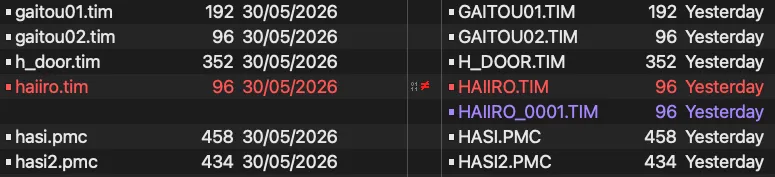
It appears that there’s an extra file in the output that we don’t have, and the
one we do have seems to have a difference in bytes. If we just extract the
filenames out of the .PAC, we can check to see how many times haiiro.tim
appears:
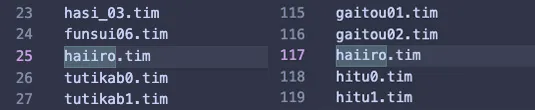
The 25th entry, and the 117th entry confirm that PAC files can contain duplicate filenames, but what is different about them?

It’s a little hard to see in this view, but if we load it up into a viewer, the difference is a little clearer:
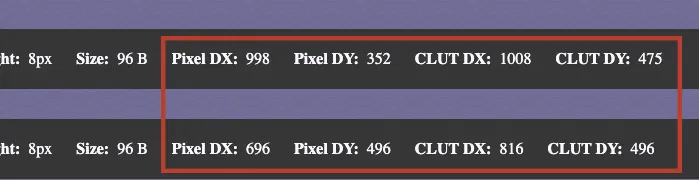
So, the difference between the files is that they seem to reference different coordinates within the frame buffer - while .TIM files are simple 2D textures, it’s also useful to consider them as something akin to a VRAM patch file. Loading one up is loading their CLUT and Pixel data into pre-defined positions within the buffer, so having multiple in a PAC makes sense in the regard that you may need to shift things around depending on what else is being loaded in.
In any case, this means our script should consider that the same file will appear twice within a PAC, and so we shouldn’t clobber the existing file with the same name - this can be solved by just appending a number to the end of name.
Note that when it comes to recompressing .PAC files, we’ll have to remember to
revert this change, which is probably something contained within the .BIN file
that TF5PAC also outputs as part of its work. But I’ve abosolved myself of that
issue for now by just focusing on extraction.
Exploring the output
With that all done, we’re ready to go through and decompress all our .PAC files:
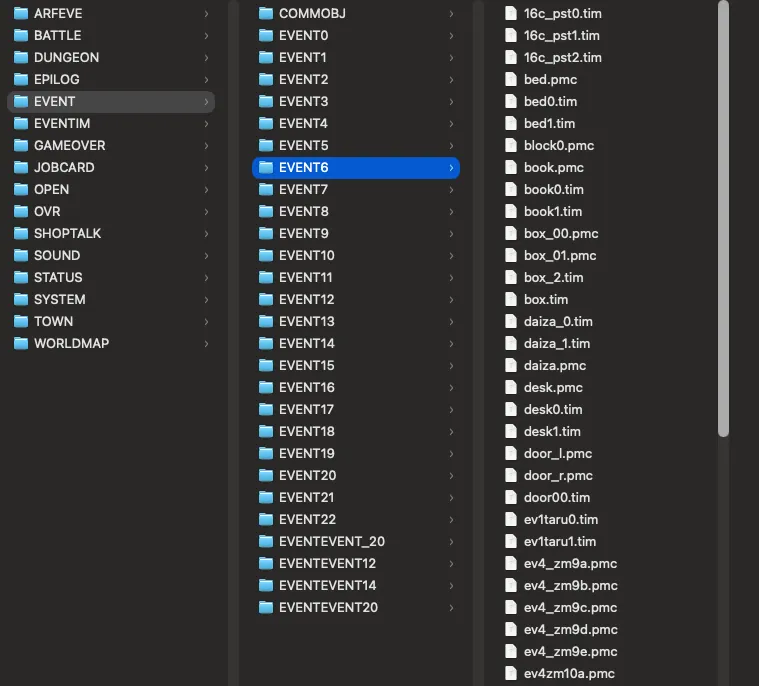
Files
There’s actually a ton of files here.
> find ./ -type f | wc -l
16235
…over 16 thousand to be exact?!
> fdupes -r -m ./
12252 duplicate files (in 1693 sets), occupying 12.9 megabytes
It appears that 1693 of our files are duplicated ~12,000 times, and there are another ~2000 unique files (giving us a number close to our 16,000).
This makes sense, especially when you consider how CDs work - aligning our items one after another for cuts down time we have to seek for it by moving the laser elsewhere. When it’s all no more than a couple hundred kBs, no harm in getting duplicating to get that performance boost.
Images
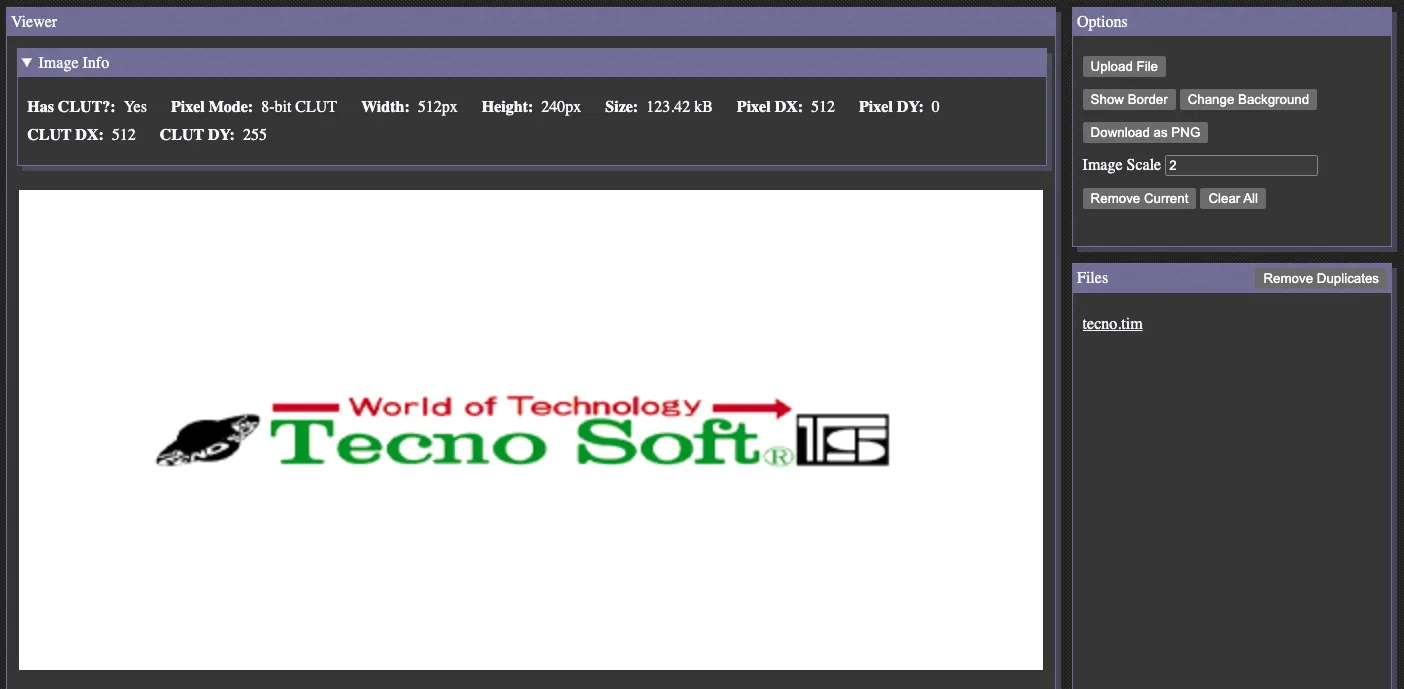
Many of our files are the aforementioned .TIM images. Here’s the Technosoft
splash taken from the output, viewed in a TIM viewer:
You could spend hours looking through them, to be honest - from textures used on the 3d models, through to this:
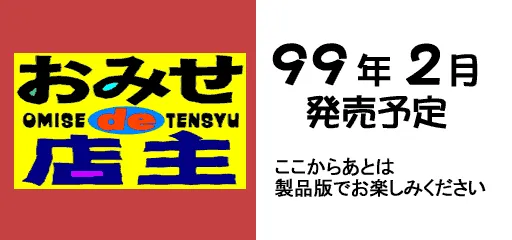
This roughly translates to “Scheduled for release in February 1999, please enjoy the rest of the game in the full version.” - seems more than just the TGS flags ended up in the full production version of the game.
.txt files
We also have hundreds of .txt files with ShiftJIS encoding. It seems like these
contain the in-game text, and probably where we can begin to translate
(if one so desired).
The format seems to be new-line seperated text, and maybe switches between even and odd lines for female and male playable characters, using @ as the substitution marker:
お姉さん美人でござるな@これほどの美人は他にいないでござる // female
お兄さんカッコイイでござるよ@アイドルに間違われるであろう? // male
Some of them also come with the header:
*****************************************************************************
*     This file is created by awk
*       Created from [CUS12.CSV]
*****************************************************************************
*                                        Programed by S.Nagata
*****************************************************************************
It’s pretty cool to see people leave their name in their code like this - OOTUKA in the PAC output, Nagata here - the executable makes mention of a YUMIMINT and their audio library. None of these names appear in the credits under programmer, so feels a bit like archaeology digging through the pieces to get more of an idea of who worked at Technosoft in the 90s.
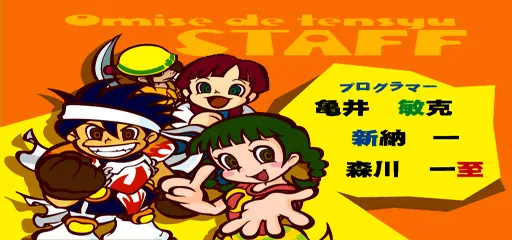
(Translating names is pretty difficult Japanese for me, but you can find a list here if you’d like to google yourself)
Actually, on names, it appears Technosoft used handles every now and then for games credits - YUMIMINT is probably the same CYBER YUMIMINT in the Thunder Force 5 credits. It’s an interesting note that they didn’t in this case.
In terms of odd files, there is one - STAFSCRL.txt:
*「おみせde店主」
*スタッフ(仮)
*テスト0:NAME
*テスト1:
*NAME
NAME
*テスト2:
*NAME
NAME
NAME
*テスト3:
*NAME
NAME
*1999 TechnoSoft
*つづく・・・
*終了!
E
This was probably a test program for the credits scene, but inevitably never
used - the credits image above was pieced together by extracting the .TIM
images from the epilogue scenes.
ZTCDATA.OT
When we first opened the CD, I mentioned that ZTCDATA.OT may have been media
or something, and then promptly never mentioned it again.
Now that I know more about how the game is put together, I’m inclined to believe
that this isn’t media, but another junk file to position the game on the disk
predictably. I came to this conclusion because the file is never refereneced
directly in the executable (OT.IX and OT.IM are), and from what I can
gather, neither is its sector. Not to mention, most of the cutscenes are done
in-game, rather than pre-rendered video, and we’ve discovered most of the audio
already.
I’m a little bemused that this game shipped with 600mb of junk data, and I know that is just how it worked back then.
Other Loose Ends
The full output contains more than just .TIM and .txt files:
> find ./ -type f | sed -e '/.*\/[^\/]*\.[^\/]*$/!s/.*/(none)/' -e 's/.*\.//' | LC_COLLATE=C sort | uniq -c
 119 000
  72 001
  59 002
  50 003
  38 004
  28 005
  21 006
  17 007
  13 008
   6 009
   5 010
   4 011
   3 012
   1 013
   1 014
   1 015
 105 evp
  69 hit
   2 moc
  27 nrs
   8 ovr
   1 pac
  27 plb
2838 pmc
   3 pmd
   1 sdf
  47 sep
12028 tim
 684 txt
   2 vb
   2 vh
A few of these are pretty standard things to see on an PS1 game - .pmd are
3D models, .tim we’ve mentioned are 2D sprites. .sep, .vh and .vb are
all audio files. These are pretty well understood in the community, and there
tend to be tools and writeups up the wazoo about all of them. .ovr are pretty
stanard too - they’re Overlays, pieces of game code not within the main
executable that are loaded at runtime to save on memory usage.
Looking into the 000 -> 015 files that appear in the AREVE folders. They
seem to be tied to the .evp files, maybe they’re parameters for the event
system?
The most glaring outlier here are those .pmc files. Guessing by their name,
and the fact that Omise is actually a 3D game, I’m thinking these are the 3D
models, just in an internal format. They don’t look like a .pmd nor .tmd the
normal PSX formats, but I don’t really have a lot of experience with them, so
I leave that as an exercise to the reader. The .hit files look like they
contain vector positions and sizes, so maybe they’re the .pmc hitboxes?
Either way, there are plenty more secrets for the discerning reader to look into, but for now I think we can leave it there.
Wrapping up
Omise de Tensyu ended up being one of the last games Technosoft released, as rumours spread in late 1999 that the company was exiting game development. By early 2000 they were seen selling their computer equipment, supposedly to recoup some costs, and in 2001 it was official as Technosoft declared bankruptcy.
The Technosoft brand was sold to a pachinko company, Twenty One, who would continue to re-release various games - Omise for example was re-released on PS3 and PSP in 2010. These days, Technosoft’s game IP is owned by Sega, who were still selling Omise on the Playstation Network as of 2016. Earlier this year, Technosoft Co. Ltd. was deregistered.
A number of staff members went off to form Ganbarion. During my research, it appears our good frend OOTUKA (who is probably Haruhiko Otsuka), went on to work for Ganbarion after Technosoft, and Ganbarion eventually went on to make Azumanga Donjara Daioh. Woo, full circle.
Code
I’ve wrapped up the implementation we’ve made in this project, and put it up on Github with a few changes here and there. Note that you will require your own copy of the game files to get use out of it.
Omise de Tensyu and Thunder Force V are likely not the only games that use the .PAC format in some way. I have a copy of My Garden which was also released by Technosoft in 1999, and I can confirm that there are PAC files that can be extracted in the same way we describe here (but haven’t dug further than that).
With that knowledge, there were a frew more games between 1997 (when TFV was released) and 1999 that could use similar formats. I’ll chuck them out just in case a drive-by Google search pops this post up:
- 1997 - Neorude
- 1997 - Neorude 2 (a sequel in the same year is wild)
- 1997 - Kumitate Battle Kuttu Ketto (three games in a year is also wild)
- 1998 - Kaze no Oka Kouen nite
- 1999 - Neorude - Kizamareta Monshou (Technosoft’s last game released)
Technosoft also did a couple games in conjunction with Bandai, so these may also include some too:
- 1998 - Silent Moebius: Gen-ei no Datenshi
- 1999 - Getter Robo Daikessen!
Thanks
If you’ve made it this far, thanks! It was a fairly long one. I wasn’t joking when I said I like to pull these games apart for emoji content, but it actually turned into a rather fun puzzle. I personally think projects like these are like the programmers sudoku - you’re trying to fill in gaps so that the numbers line up with one another. I’d say in this case, Omise was a relatively straightforward project, considering I didn’t have to pour over lines and lines of assembly output, but it still took ~3 months on-and-off again research to put together.
I’d like to shout out to lab313ru who (from what I gather) wrote TF5PAC. Without their tool, many things would have been too hard for my monkey brain.
If you’re interested, I’ll never stop plugging Hilltop - I actually met them once for lunch after TGS one year, and he’s a very cool dude - but his videos give a very good starter for getting into this stuff.
I’d also recommend jumping on the PSX.dev Discord. More than once I utilised the search bar on this to hunt for information, but also if you’re interested in PSX homebrew, there is a decent community here for it.
Lastly, as a complete tangent, I’d like to highlight meowandmeow.info. I stumbled across this site during a deep dive on the games listed in the Shitty Games book, and it’s exactly the sort of niche site I love. They’ve not been active as of late, but there’s still a lot of content to dig through in the meantime.
Here’s hoping I don’t take three years to do another writeup - Until next time!